

Choosing the Best WMS Software for Small & Mid-Size 3PLs: A Guide
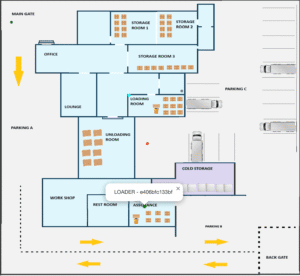 WMS software for small business management.
A structured evaluation framework to help third-party logistics operators scale multi-client tenants, eliminate floor guesswork, and protect profit margins without overpaying for enterprise complexity.
For a small or growing third-party logistics (3PL) provider, choosing the right Warehouse Management System (WMS) is existential. General inventory tools break the moment you try to manage multiple clients under one roof, while enterprise platforms saddle you with six-month implementation cycles and license fees that devour your margins.
Whether you are scaling a regional 3PL operation or upgrading from spreadsheets and legacy desktop tools, this guide outlines the critical criteria required to select a multi-client WMS built for operational velocity.
1. What Makes a 3PL WMS Different?
Unlike a private warehouse storing a single company’s catalogue, a 3PL operates in a shared environment where multi-tenancy, client-specific billing, and strict data isolation are mandatory.
When evaluating software, your requirements must extend beyond basic stock tracking:
Tenant Data Isolation: Every client’s stock, orders, and product catalogues must remain 100% invisible to other clients, even though they share the same physical floor, team, and login.
Rapid Client Onboarding: Onboarding a new client should be a live administrative dashboard action—completed in minutes—rather than a custom IT configuration.
Client-Ready Reporting: The system must generate transparent, exportable activity logs and stock reports that you can hand directly to your clients for audits and billing verification.
2. Core Operational Pillars for 3PL Warehouses
A purpose-built 3PL WMS must solve the specific bottlenecks that drain billable hours:
Multi-Client Billing & Traceability: Track exactly which client owns which pallet from receiving to dispatch, capturing time-stamped user logs automatically to justify storage and handling fees.
Intelligent Rotation (FIFO & FEFO): For 3PLs handling food, cosmetics, or pharmaceuticals, system-enforced First-Expired, First-Out (FEFO) picking prevents costly spoilage claims and liability issues.
Put-Away Without Guesswork: “Suggest empty slot” functions automatically direct staff to the nearest free, correctly-typed bin based on product dimensions and handling classes (e.g., general vs. hazardous or temperature-controlled).
Receiving Without Retyping: Shared product masters auto-fill descriptions, categories, and barcodes upon scanning, eliminating manual data-entry errors from inbound delivery notes.
3. Evaluating Deployment Models and Scalability
Modern 3PLs operate in fast-moving environments where agility dictates profitability.
Cloud SaaS Architecture: Essential for multi-location 3PLs. Cloud deployment avoids heavy local server maintenance, allowing branch managers and floor supervisors to manage inventory via standard Wi-Fi or mobile handhelds.
Modular Technology (RTLS & Pick-to-Light): Growth shouldn’t force a disruptive re-platforming. Choose a system where advanced features like Bluetooth Pallet Tracking or Pick-to-Light guidance can be toggled on as modular add-ons when client volumes demand it.
Digital Twin Simulation: For high-volume 3PL facilities, leveraging Warehouse & Facility Digital Twins Software allows you to simulate traffic patterns, optimise slotting for high-turnover clients, and preemptively eliminate floor bottlenecks.
4. Where Ripples-FMS Fits for Growing 3PLs
There is no single “best” WMS for every warehouse. Ripples-FMS is purpose-built for small-to-mid-size 3PLs and public warehouses that need enterprise-grade multi-client capabilities without the enterprise overhead.
Why 3PL operators choose our platform:
True Multi-Client Management: Securely run multiple tenants on a single floor and log in with strict data partitioning.
Native RTLS Integration: Real-time asset visibility to track high-value client pallets down to the exact rack level.
Automated Audit Trails: Full lifecycle visibility from gate-in to gate-out, keeping you inspection-ready for every client simultaneously.
Ecosystem Integration: Pairs seamlessly with Demand Forecasting and transportation modules to unify your entire logistics chain.
Frequently Asked Questions – Best WMS software
How does a 3PL WMS handle inventory belonging to multiple clients? A true multi-client WMS partitions data at the database level. Each client has isolated visibility into their own stock levels, order histories, and SKU catalogues, while warehouse staff operate out of a unified, optimised pick-and-pack workflow.
Can I start with core barcode scanning and add real-time tracking later? Yes. Modern modular systems allow you to deploy standard barcode receipt and picking workflows first, then seamlessly layer on Bluetooth Low Energy (BLE) RTLS tracking or Pick-to-Light modules as your 3PL scales.
What is the fastest way to evaluate if a 3PL WMS fits my operation? Request a tailored proof of concept (POC). Testing the software against your specific multi-client product mix and warehouse layout is the only reliable way to verify put-away logic and pick speeds before committing.
Depending on your operational volume, you can choose the right architectural depth. Small businesses looking for foundational stock control can deploy our standard inventory management software. High-velocity facilities and multi-client 3PLs ready for automated tracking can step up directly to our Smart Warehouse Management System (WMS 2.0).
Ready to Scale Your 3PL Operations?
See how a multi-client, purpose-built WMS fits your floor layout and tenant workflows. Request a free demo and book a proof of concept to test the platform directly in your facility.